
Perfect Piano
Revontulet SoftMusic & Audio
4.224.97K Reviews
- Version
- 8.0.0
- Installs
- 100.00M
- Age Rating
- Everyone
Screenshots
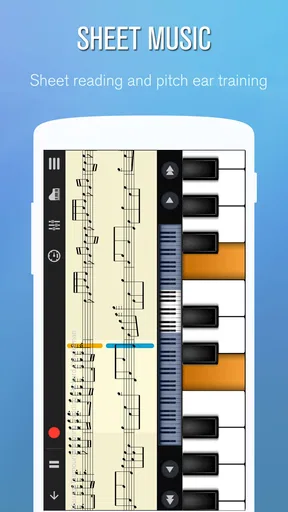
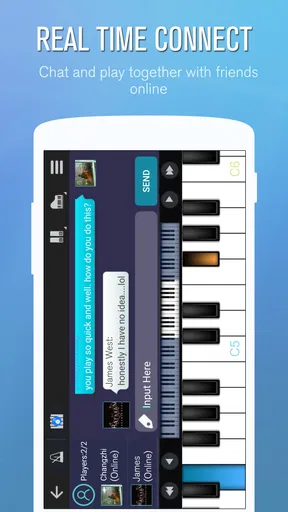
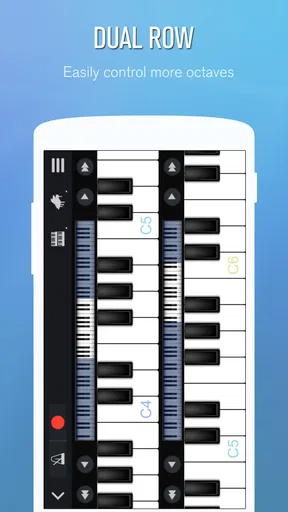
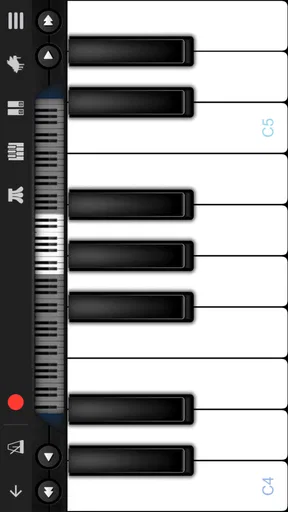
Our Review of Perfect Piano
 Analysis by Appyee
If you’ve ever dreamt of having a full-sized piano at your fingertips, then Perfect Piano might just be your new best friend. I’ve been tinkering around with it for a few days now, and let me tell you, it’s one impressive little app that packs a punch. Whether you’re a seasoned pianist or just starting out, there’s something in here for everyone.
What a phone piano is good for
I’d think of this as a convenient way to explore melodies, practise simple passages, and get a feel for notes rather than a complete replacement for a piano or keyboard. The touchscreen makes it easy to begin without buying or setting up an instrument, but it also changes how playing feels: your fingers land on glass, and the available space is limited compared with physical keys. That trade-off is fine for casual practice and musical curiosity; it matters more when you need precise technique or want to work on a demanding piece.
That distinction helps set expectations before you start. If you’re waiting for a bus and a tune comes to mind, you can open the keyboard and try to find it. If you’re preparing for a piano lesson, the app may be useful for reviewing a note pattern, but I wouldn’t use touch input alone to judge posture, finger strength, or the feel of a real instrument.
A gentle route from opening the app to playing
For a first session, I’d keep the goal small: choose a comfortable keyboard layout, pick a familiar tune, and find its opening notes by ear or with the learning material. Resist the temptation to explore every sound before playing anything. A short, recognisable phrase gives you a quick sense of whether the key spacing and touch response suit you, and it makes the app feel less like a menu of options and more like an instrument.
If your first attempt sounds uneven, change one thing at a time. Try a different key size before changing sounds, or slow a practice passage rather than repeatedly restarting it at full speed. On a phone, accidental taps and crowded fingers can be part of the learning curve. A tablet can make the keyboard easier to see and reach, while a phone is better for quick, informal sessions.
It also helps to use headphones when you want to focus on your playing in a shared room. That is a practical choice rather than a requirement, and it can make a short practice break less disruptive. If you are trying to learn a melody, listen for the shape of the phrase first—whether it rises, falls, or repeats—then work out the individual notes. This gives you a manageable task instead of expecting your hands to find a whole song immediately.
Getting Started with Perfect Piano
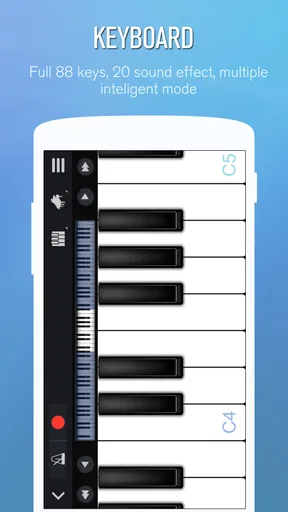
The first thing you’ll notice once you download Perfect Piano is its intuitive interface. Launching the app, you’re greeted with a realistic keyboard layout that’s ready to play. It’s pretty neat how the app simulates a real piano, and honestly, it’s quite satisfying to see those keys light up as you play.
Setting it up took no time at all. Just a couple of taps and you’re all set to start playing. For those new to the app, there’s a handy tutorial that walks you through the basics, which I found super helpful. You can customize the number of keys shown, and even adjust the key size to suit your comfort level.
Features That Stand Out
One of the standout features of Perfect Piano is its plethora of sound options. You’re not just limited to standard piano sounds; there’s a whole library ranging from organs to synths. It’s like having an entire sound studio in your pocket. I spent a good chunk of time just experimenting with different sounds and honestly, it was a blast.
Another feature I loved is the recording option. You can easily record your sessions and play them back, which is perfect for tracking your progress or just showing off to friends. Plus, with the ability to share your recordings, you can easily post your masterpieces on social media. Talk about making your friends jealous!
Using the tools without getting sidetracked
The wide choice of sounds is enjoyable, but I find it most useful when I treat it as a way to compare musical character, not as a substitute for learning notes. Try a short phrase on the piano sound first, then replay it with an organ or synth. You’ll hear how the same pattern can feel more sustained, bright, or electronic. That little experiment can help a beginner notice how timbre changes a tune without changing its melody.
Recording can be more than a way to save a polished performance. I’d use it as a private checkpoint: play a short section, listen back, and notice where the rhythm wobbles or a note gets missed. Then practise just that spot before recording again. This is more useful than making lots of recordings without reviewing them, and it avoids turning a casual session into a performance contest.
For an everyday example, imagine you have ten quiet minutes before dinner and want to work out the chorus of a song you heard earlier. You can open the app, use a familiar sound, and test a few notes without unpacking an instrument. If the idea starts to take shape, record the phrase so you can return to it later. If the room is noisy or you need exact timing, though, a real keyboard and a more focused practice setup will serve you better.
Learning and Playing Made Easy
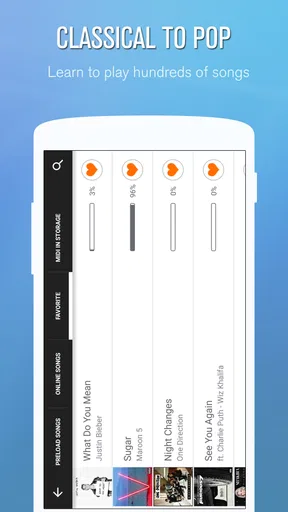
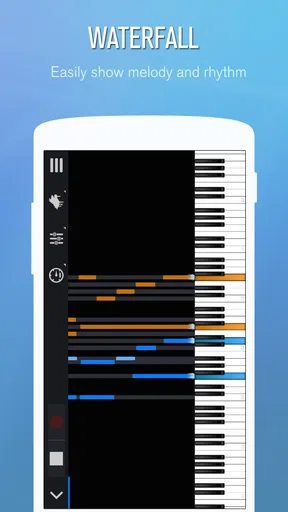
For those wanting to learn, the app comes with a slew of songs to practice. It’s like having a music teacher on standby 24/7! You can follow along with the sheet music and adjust the tempo to suit your learning pace. There are interactive lessons too, which break down songs into manageable chunks.
The app also supports external MIDI keyboards, which is a huge plus if you want to practice on a real keyboard while still using the app’s learning features. It’s all about flexibility here, and I’m all for it.
Choosing the right practice setup
A useful next step is to move from tapping out a melody to repeating a small section deliberately. Pick one passage from a practice song, reduce the tempo until you can follow it comfortably, and repeat it before moving on. The point is not to race through a complete piece; it’s to make a difficult transition less intimidating. If you already own a MIDI keyboard, connecting it can make this kind of work feel closer to playing on an instrument, while the phone remains useful for the app’s learning tools.
This is where I’d draw a line between casual learning and serious study. The app can help you revisit songs and get regular contact with notes, but a teacher or a structured course is a better choice if you need feedback on technique, reading, or musical expression. Likewise, if your main goal is to compose with detailed editing and arrange several parts, a dedicated music-making app is likely to offer a more suitable workflow than a touch piano.
Community and Connectivity
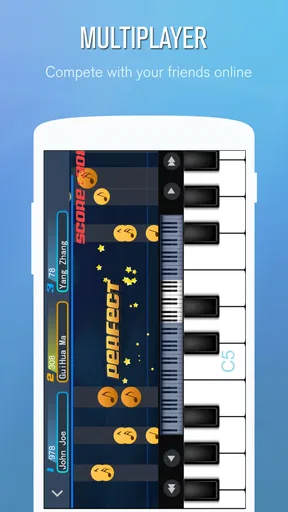
One of the things I didn’t expect was the community aspect of Perfect Piano. There’s an online multiplayer mode where you can challenge other players or even collaborate on duets. It’s a fun way to connect with other music enthusiasts, and it adds a whole new dimension to the app.
You can also join the app’s community forums to share tips, tricks, and even song requests. It’s a vibrant space filled with passionate individuals, and it’s great to see how music can bring people together.
When social play helps—and when it doesn’t
Playing with other people can be a welcome change from repeating a passage alone. I’d approach multiplayer as a reason to try a tune and enjoy a shared musical moment, not as a measure of whether you are progressing quickly. New players may feel more comfortable practising privately first, especially while they are still learning where notes sit on the screen. If online interaction is not part of what you want from a music app, the keyboard and practice tools remain the more relevant parts of the experience.
Compared with a basic piano simulator that only gives you keys to tap, the learning material, recording, MIDI support, and social play make this a broader starting point. Compared with a full digital audio workstation or a dedicated piano course, it is less specialised: it aims to let you play and explore without making setup the main event. That middle ground is its appeal, but it also means users who want deep composition controls or a carefully guided curriculum may prefer an app built specifically for those goals.
Who I’d recommend it to
I’d suggest trying it if you’re curious about piano, want a handy way to practise a simple tune, or would like an accessible companion for a MIDI keyboard. It can also suit someone who wants to record a musical idea before forgetting it, or who enjoys playing casually with other users. The free price makes it easy to try, while in-app purchases are available for people who choose to spend on optional items; I’d start with the free experience and see whether the tools fit your routine before buying anything.
I’d look elsewhere if your priority is realistic piano technique on a touchscreen, advanced arranging, or personalised teaching. The screen is a practical stand-in, not a full-size keyboard, and no collection of sounds can change that physical limitation. A real digital piano is a better fit for building touch and hand coordination, while a specialist learning service may be more helpful when you need a clear course and detailed feedback.
Final Thoughts
All in all, Perfect Piano is a fantastic app for anyone interested in music. It’s packed with features that cater to both beginners and advanced users alike. Whether you’re just noodling around or seriously practicing, this app offers a comprehensive and enjoyable experience.
Revontulet Soft’s music and audio app has been around since January 21, 2014, and version 7.9.8 supports devices running Android 6.0 or later. It has a 4.2 average from around one million ratings, with about 25,000 written reviews and over 100 million installs. It is free, rated for Everyone, and offers in-app purchases ranging from $0.99 to $5.99 per item. Those figures suggest a well-established app, but I’d still judge it by whether its touch keyboard and practice approach suit the way you want to play.
So, if you’ve got a hankering to tickle the ivories, or if you just want to try your hand at playing some tunes, give Perfect Piano a go. It’s like having a concert grand piano in your pocket, minus the hefty price tag and space requirement. Happy playing!
Privacy and Permissions
See what permissions an app requests and how it handles your data.
- Photos/Media/Files
- read the contents of your USB storage, modify or delete the contents of your USB storage
- Storage
- read the contents of your USB storage, modify or delete the contents of your USB storage
- Camera
- take pictures and videos
- Microphone
- record audio
- Wi-Fi connection information
- view Wi-Fi connections
- Other
- view network connections, full network access, control vibration, prevent device from sleeping, Google Play license check
Verdict
Strengths of Perfect Piano
- User-friendly interface for all ages.
- Wide variety of songs to practice.
- Customizable keyboard settings.
- Supports MIDI and external keyboards.
- Interactive learning tools included.
Limitations of Perfect Piano
- Ads can be intrusive during use.
- Some features require in-app purchases.
- Occasional app performance lags.
- Limited free song selection.
- Interface can feel cluttered.
Similar Picks in This Category
View All
YouTube Music
Google LLC4.4

Samsung Music
Samsung Electronics Co., Ltd.3.8

Spotify: Music and Podcasts
Spotify AB4.3

JioSaavn - Music & Podcasts
Saavn Media Limited4.3

Lark Player:Music Player & MP3
Lark Player Studio - Music, MP3 & Video Player4.6

StarMaker: Sing Karaoke Songs
SKYWORK AI PTE. LTD.4.3
Frequently Asked Questions
Is Perfect Piano suitable for beginners?
Yes, Perfect Piano is highly suitable for beginners. It offers a user-friendly interface and various tutorials to help new users learn piano basics. The app includes a variety of modes, such as learn-to-play and practice modes, which are designed to guide beginners through the learning process step by step.
What features does Perfect Piano offer?
Perfect Piano provides a wide range of features, including a full 88-key piano keyboard, multiple sound effects, and customizable key sizes. It also offers a multiplayer connection mode, allowing users to play with friends. Additionally, the app supports MIDI and external keyboards, enhancing the overall learning and playing experience.
Can I record and share my performances in Perfect Piano?
Yes, Perfect Piano allows users to record their performances easily. You can save your recordings directly within the app and share them with friends or on social media platforms. This feature is particularly useful for tracking progress and receiving feedback from others.
Does Perfect Piano require an internet connection to use?
Perfect Piano can be used offline for most of its features, including playing and recording. However, certain features, such as multiplayer mode and downloading additional songs from the library, require an internet connection. This flexibility makes the app convenient for users who may not always have internet access.
Are there in-app purchases in Perfect Piano?
Yes, Perfect Piano does offer in-app purchases. While the basic version is free and includes many useful features, users can purchase additional song packs and advanced features. These purchases enhance the app's functionality, providing a richer and more personalized learning experience.
